
School Assistant Version 5 released today with support for Siri AI, Spotlight, Shortcuts, and Smart Create! This update also brings numerous new features, including some of our most-requested features.
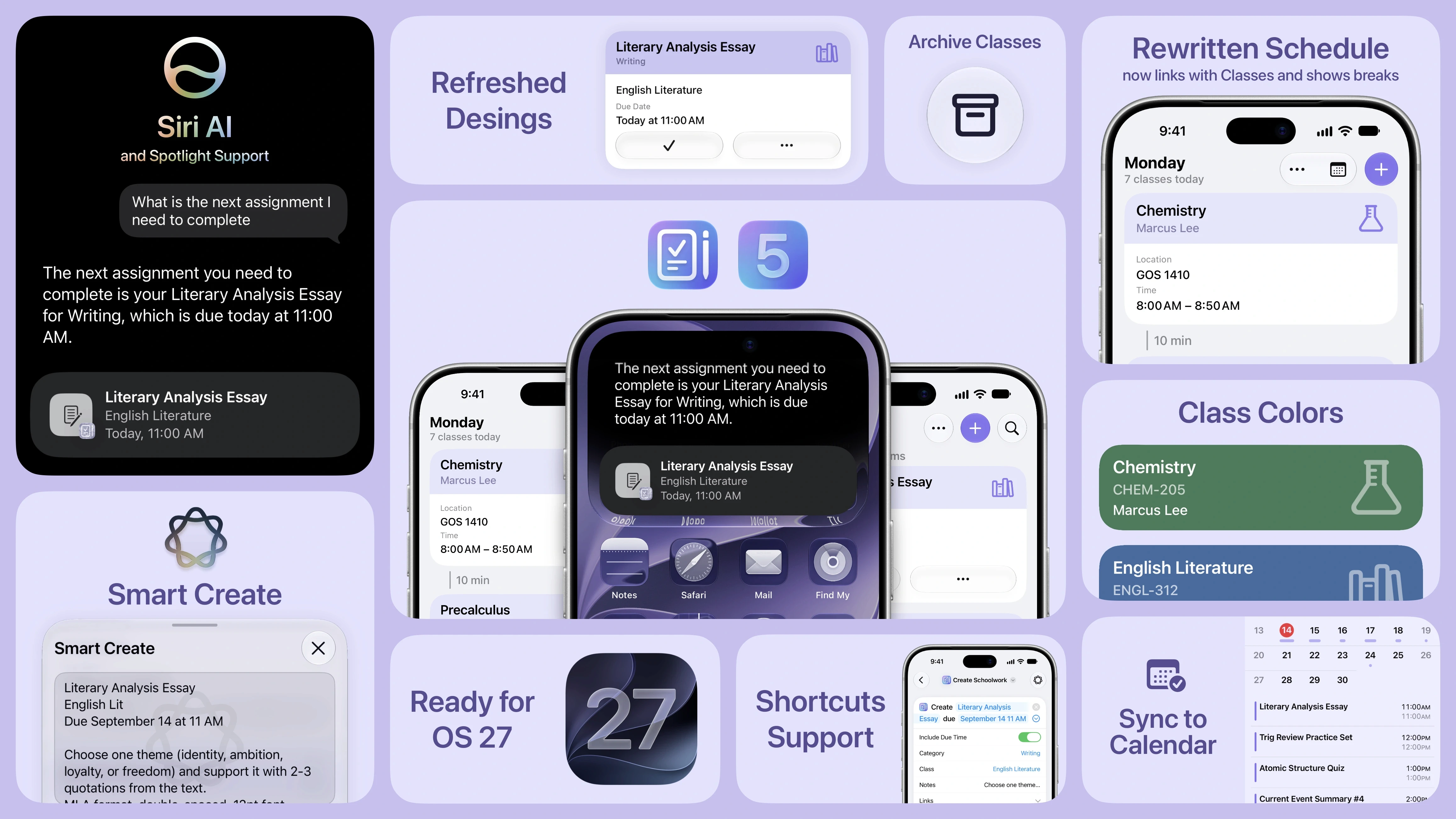
Siri AI, Spotlight, and Shortcuts Support
School Assistant now integrates with the all-new Siri AI on supported devices! You can ask Siri about your Schoolwork and Classes, ask Siri to create new assignments for you, and ask Siri to modify your Schoolwork. You can also now use Siri Shortcuts to get, create, update, open, etc. your Schoolwork and Classes. This is an initial implementation and we hope to expand it in the future.
Smart Create
Using the power of Apple Intelligence, you can quickly and easily generate Schoolwork and Classes. Just paste or type in the information you want to add, and Smart Create will help you format it and create a new Schoolwork or Class.
iOS 27, macOS 27, and visionOS 27
School Assistant has been fully updated and refreshed for the latest Apple updates!
Schedule Rewrite
The backend that powers Schedule has finally been fully rewritten. This is an important step for future improvements, but it also brings many new things today:
Schedule is finally linked with Classes! No more manually re-entering all that info. And you can see Class icons, like with Schoolwork.
Automatic sorting! Now Schedule will automatically sort your classes by their starting time.
Unlimited days! You are no longer limited to 20 days.
Improved day management! Schedule day names are more reliable, you can reorder your days, day duplication is better, and you can now easily delete a day.
Schedule will now show the breaks between your classes! You can configure how and when they show in Settings.
Support for Location AND Link, or neither. If you add both, they will both show up, and if you add neither, nothing will show.
Tapping an entry in Schedule will now show Class Details for the linked class. You can still tap and hold on the entry to edit its details.
And more to come! This backend rewrite opens up the door for many much-needed improvements down the line.
Class Colors
This is by far one of our most requested features! Now you can set a color for each of your classes. And, there are many ways to show these colors throughout the app. Head to Settings → Class Color Styles to pick your favorite styles.
Schoolwork Categories
Now, instead of being limited to just Assignment or Test, you can choose from a list of presets or create your own categories. And, for easy identification, each category supports choosing a dedicated icon! You can also now filter by those categories.
Apple Calendar Integration
With Version 5, your Schoolwork can now show right up on your Apple calendar! Over the years many users have requested a calendar view, and we think this is the best solution. Any changes you make in School Assistant will be reflected on your calendar and it will sync over iCloud or any calendar service you choose.
Schoolwork Enhancements
You can now filter your Schoolwork by class and/or category.
You can duplicate an existing Schoolwork.
When creating a new Schoolwork, you now have the option to Save and Duplicate, which saves in the background without taking you out of the New Schoolwork interface.
Due dates can now be shown as a countdown / timer.
The due date countdown will now count up when past due.
Refreshed Design
Version 5 introduces a new “Index Card” design for Schoolwork, Schedule, and Classes! This new design shows more information in less space while highlighting the most important information, such as class and category.
Archived Classes
When you’re done with a class, you can now save it in your archive. Or when you’ve completed a semester, you can archive all classes at once.
Deep Link Support
You can now copy a special link for any Schoolwork, Class, Schedule Day, or Schedule entry. When opening this link in Safari or elsewhere, School Assistant will open and take you right to that item.
Availability
School Assistant Version 5 is available now on the App Store for iOS, macOS, visionOS, and watchOS. Version 5 supports iOS 17, macOS 14, visionOS 2, and watchOS 9 or later. Please note that as of Version 5, certain features will no longer be compatible with previous versions of School Assistant.
Refreshed marketing and a new website will be coming at a later date.
Other New Features
Throughout the app, all web link features now support saving deep links for quick access to other apps
Added a new setting to rearrange the sections of Schoolwork Details and Class Details to your liking
When you quit the app with extra windows open (such as Schoolwork Details), the app will now properly restore those windows upon reopening
Rewrote the Accent + Theme Color system to be far more reliable and faster to update
In Schoolwork, Schedule, and Classes, you can now select multiple items to perform bulk actions, such as deleting or assigning a category
Added the option to save a link from a Class or Schoolwork to Saved Websites with one click
New option to select and delete certain data, like Schoolwork and Classes, when starting a new semester / term (Settings → Reset Options → Start New Semester or Term)
Added the class code to main Classes tab
Rearranged the order of detail fields in Schedule entries to make more sense
Added Class details to Schedule and Current/Next Class on the Apple Watch app
Added the ability to export and import your data for safekeeping
Accent and Theme Color now support richer and more vibrant P3 colors
Refreshed all app icon options for iOS 27 / macOS 27
New “Glassy” alternate app icon option
Added new iCloud Status page in Settings → Help and Feedback
Bug Fixes and Improvements
Fixed crash when tapping + in Schoolwork on iOS 27
Fixed a potential crash in the Classes / Website icon selector
Fixed Apple Watch current/next class views not auto-updating
Fixed New/Edit Link and New/Edit Subtask popup views dismissing themselves when changing windows or clicking outside the view
Fixed Teacher Details and Notes editing screens in Class Details not using a popup view when appropriate
Improvements to New/Edit views
Improved animations when changing Schoolwork mode and Schedule days
Improved performance of App Icons settings
Improved some navigation bar buttons on Mac
Sun Apps, LLC
Copyright © 2026 Dylan McDonald